Open a .pub file without Publisher
Publisher stopped being part of Microsoft 365 on October 1, 2026, and subscribers lose the ability to open .pub files in it as the update arrives. Choose your file here to get its text and pictures back, page by page.
- The words, tables and pictures come out page by page, and you can save them as a Word file. Publisher's fonts, colours and exact layout are not rebuilt.
- Reads files saved by Publisher 2002 and later. Tried on files from Publisher 2003, 2007, 2010 and 2013.
- Nothing is uploaded. The file is read in this tab, on your own computer.
Unframe is an independent tool by Peak Apps Studio. Not affiliated with Microsoft. Publisher is a trademark of Microsoft.
Open a Publisher file
Drop a .pub file on this frame, or choose it from your computer. Publisher keeps the file as it is; this page only reads it.
Have a whole folder of them? and Unframe lists every .pub file in it and checks which ones it can read.
The sample is a small real Publisher file made by the Apache POI developers: two pages, a table and a few links. What is a .pub file?
Opening your file
Reading it in your browser.
Publisher files in your selection
| File | Result |
|---|
Your file never leaves this computer. This page reads it, here, and nothing in it is stored or sent. We count page visits with Cloudflare Web Analytics: no cookies, no personal data, and never your files.
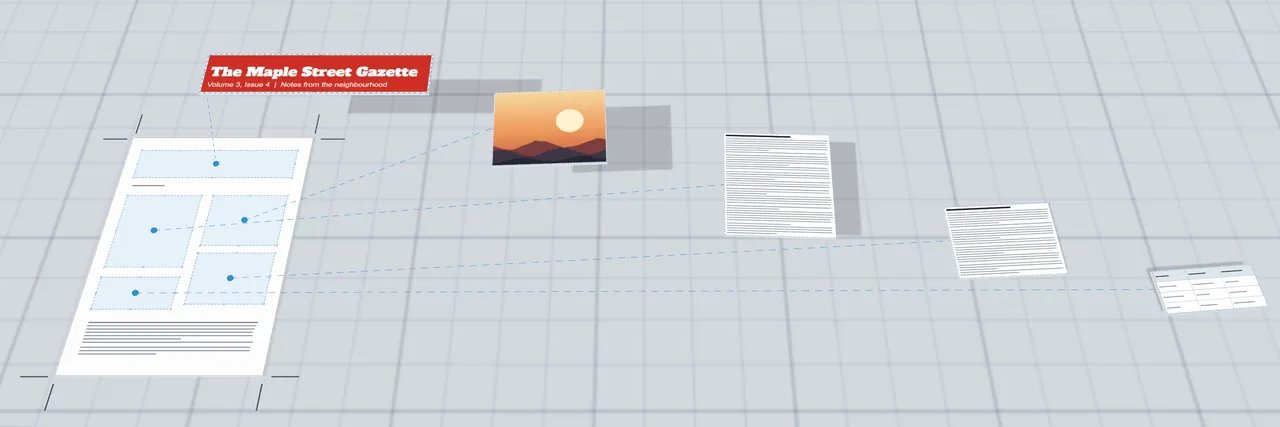
Your file, page by page
Sample file, made by the Apache POI developersThe pages
Each sheet shows where the text boxes (dashed), tables and pictures (crossed) sat on the page. Pick a page to read its text.
What comes out of a .pub file
A .pub file holds the text of every text box, the pictures, and a lot of layout: where each box sits, its fonts, colours, borders and shapes. Unframe reads the first two completely and the position of each box, and leaves the look behind.
| Part of the file | What Unframe does |
|---|---|
| Text boxes | Reads all the text, in reading order, page by page. Boxes that are linked so text flows from one to the next are read as one story. |
| Tables | Shows them as tables when the cells line up. A table that does not line up is shown as plain text. |
| Pictures | Shows and saves JPG, PNG, GIF and BMP pictures as they are stored. Clip art stored as WMF or EMF is drawn on the page and saved both ways, as the original and as a PNG. |
| Links | Lists the web and email addresses stored in the file. It does not tie each one to the words it was on. |
| Headers, footers, repeated items | Lists the text and pictures that sit on the master page, which Publisher repeats on every page. |
| Fonts, colours, borders, shapes, effects | Not rebuilt. Each box is drawn as an outline on the page map, at its position. |
| Password-protected files, Publisher 98 and 2000 files | Not read. Unframe tells you which one it met. |
Unframe was tested on 15 Publisher files from the public test collections of Apache POI and Apache Tika (a few are copies of one document saved by different versions), saved by Publisher 2003, 2007, 2010 and 2013, plus damaged and look-alike files. We had no file saved by Publisher 2016, 2019, 2021 or Microsoft 365, so a file from those can still surprise us. Clip art stored as WMF was tested on real files; none of the test files held EMF clip art, so that part is untested. Where something cannot be read, the page says so and does not guess.
Sources: Microsoft Support, Microsoft Publisher will no longer be supported after October 2026; Microsoft 365 Message Center post MC1469564 (published September 9, 2026, updated October 21, 2026). Last checked: October 28, 2026.
If you need the layout too
Unframe is for getting the words and pictures back. When the look of the page matters, there are better routes, and which one fits depends on whether you still have Publisher.
- You still have Publisher: save the file as a PDF there (File, Save as, PDF). Microsoft says this is the way to keep a file you only need to view, share or print, and that it provides a script to convert a whole folder.
- You do not have Publisher: LibreOffice Draw and Scribus can import .pub files with their own layout; how close they come depends on the file.
- Online converters upload your file to their servers and return a PDF or Word file. Unframe does not.
The steps and the details are in PUB to PDF: every way to do it.
Questions
How do I open a .pub file without Publisher?
Choose the file on this page. Unframe reads it in your browser and shows the text and pictures page by page, and saves them as a Word file, plain text, Markdown, a web page or a ZIP of pictures. It does not rebuild Publisher's layout, fonts or colours. For the layout, open the file in LibreOffice Draw or save it as a PDF from Publisher while you still have it. More: PUB to PDF.
Is Microsoft Publisher being retired?
Yes. Microsoft's support page says Publisher reaches end of life in October 2026. It is no longer included in Microsoft 365 as of October 1, 2026, and Microsoft 365 subscribers can no longer open or edit .pub files in it. The update that removes it from Microsoft 365 apps starts with version 2611, from mid-November 2026 on the Current Channel. The dates are in Publisher retirement: dates and what happens to .pub files.
Is my file uploaded?
No. The .pub file is read by this page in your browser, on your computer. Nothing in it is sent or stored, and closing the tab discards it.
Does it keep the layout?
No. Unframe gives you the words, tables and pictures page by page and draws each text box and picture frame as an outline where it sat on the page, but it does not rebuild fonts, colours, shapes or borders. If the look matters, use LibreOffice Draw, or save a PDF from Publisher before it is removed.
Which Publisher versions does it read?
Files saved by Publisher 2002 and later. It was tested on files saved by Publisher 2003, 2007, 2010 and 2013. Publisher 2016, 2019, 2021 and Microsoft 365 are expected to write the same kind of file, but no file from them was available to test. Publisher 98 and 2000 files are not read.
Is Unframe made by Microsoft?
No. Unframe is an independent tool by Peak Apps Studio and is not affiliated with Microsoft. Publisher is a trademark of Microsoft, named here only to say which file the tool opens.