Your Spotify minutes listened so far this year
Open the data file Spotify sends you and see this year's minutes, your top artists, songs, albums and podcasts, the hours you listen, your longest streak and how often you skip. Then save a story card. It all happens in this browser tab: you don't log in, and the file is never uploaded.
Open your Spotify data
The ZIP Spotify emails you (my_spotify_data.zip), or the JSON files inside it. Account data and Extended streaming history both work, and you can add both.
Or drag the files onto this box. The sample is a made-up listener, built in your browser.
No file yet? Request it from Spotify today: the full history can take up to 30 days.
Reading your files
Starting
That file has no listening history in it
Your files are read in this tab and never uploaded. Only the streaming history is opened; your payment and account details in the same ZIP are skipped.
Your listening
0 minutes
Top lists
When you listen
By weekday
By month
Streaks, skips and firsts
Your top artist each month
Year against year
What was read
Request your Spotify data today
Spotify does not send the file straight away. Its Privacy page lists about 5 days for Account data and up to 30 days for Extended streaming history. Ask now and even the slow one should be in your inbox before December.
- Open your Privacy page. Log in at spotify.com/account/privacy in a web browser and scroll to Download your data.
- Tick what you want. Account data covers the last year and is enough for this year so far. Extended streaming history covers every year since you joined and records skips. You can tick both; the technical log is not needed.
- Press Request data. Then confirm with the link in the email Spotify sends you.
- Wait for the email that says your data is ready. Download the ZIP from it and keep a copy.
- Open the ZIP here. No need to unzip it. If Account data arrives first, open it now and add the extended history when it comes: plays that are in both are counted once.
| Download | Spotify's time | Covers | Files Earhours reads |
|---|---|---|---|
| Account data | About 5 days | The last year | StreamingHistory_music_N.json, StreamingHistory_podcast_N.json |
| Extended streaming history | Up to 30 days | Every year since the account was made, with skips | Streaming_History_Audio_YEARS_N.json, Streaming_History_Video_YEARS.json |
| Technical log information | Up to 30 days | App logs | None, you don't need it |
Field names and what each download holds: Spotify's Understanding your data, checked 21 October 2026.
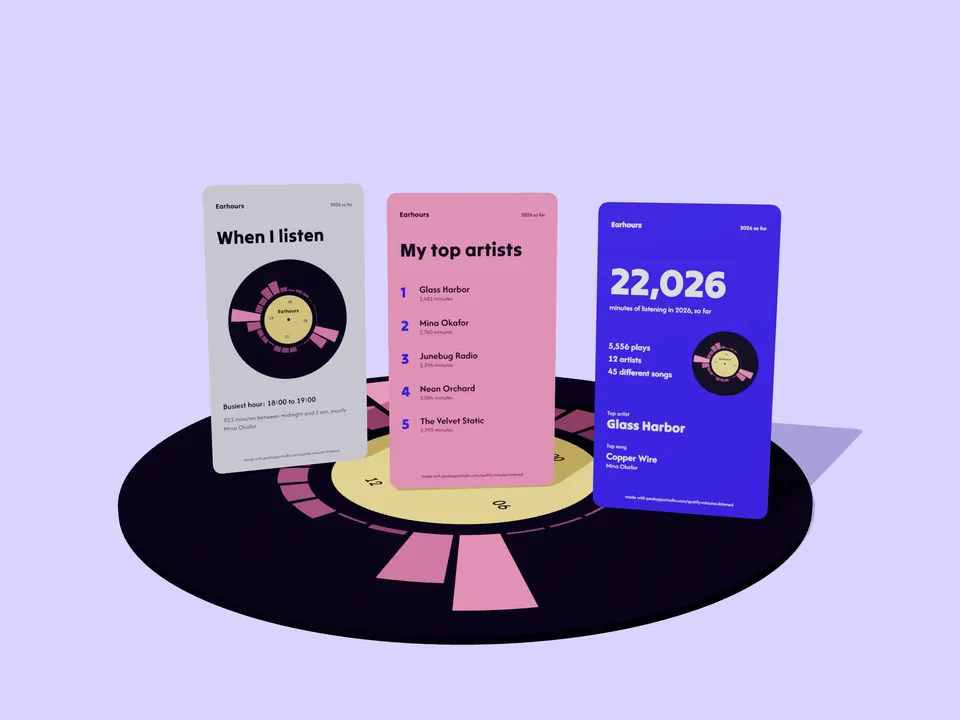
Story cards from your own numbers
The free version saves the year-so-far card: your minutes, top artist, top song and your listening clock. Pro adds top artists, top songs, the clock on its own, your streak and biggest day, year against year, and all time.
Every card is drawn in this tab. Nothing about it is sent anywhere until you share it yourself.
How Earhours counts
- Minutes
- The time every play actually ran, added up (msPlayed or ms_played in your file). Spotify describes its own year-end total the same way: actual listening time, private sessions included (Spotify newsroom, 3 December 2025).
- Top songs
- Ranked by plays of 30 seconds or more, then by minutes. Artists, albums and podcasts are ranked by minutes.
- Skips
- The extended history marks a song as skipped, or ended with the forward button. Account data has no skip field, so for it Earhours shows how many songs stopped before 30 seconds.
- Hours and days
- Spotify records when a play ended, in UTC. Earhours moves each play back to when it started and shows it in the time zone you pick, so a song at 11 pm stays on the right night.
- Pace
- For the year that is still running: your minutes so far, divided by the days from 1 January to the last day in your file, times the days in the year. It is a straight line, not a forecast of your habits.
- Both downloads at once
- The extended history is the full record up to the day it was made. Account data plays up to that moment are the same plays, so only the later ones are added.
Earhours Pro, $5 once
The free version shows the latest year in your file with top 10 lists and the year-so-far card. Pro opens the rest of the file:
- Every year in your file and all-time totals
- Year against year: minutes, top artist, top song and new artists
- Top 100 artists, songs, albums and podcasts
- All seven story cards
- A CSV of your totals and rankings
One payment through Gumroad, no subscription. The only thing Pro sends is your license key, to Gumroad, to check it.
Pro is not active on this browser.
Buy Pro for $5Questions
How do I see how many minutes I have listened to Spotify this year?
Request your data on Spotify's Privacy page (Account data arrives in about 5 days and covers the last year; Extended streaming history takes up to 30 days and covers every year). Open the ZIP Spotify emails you on this page and it adds up how long every play ran, from 1 January to the last day in the file.
Can I see my Spotify stats before the year-end recap?
Yes. Your data file has every play up to the day it was made, so you can see your minutes, top artists and top songs so far at any time of year, plus the pace you are on to 31 December. In 2025 Spotify's own recap came out on 3 December.
Which should I ask for, Account data or Extended streaming history?
Ask for both. Account data comes first and is enough for this year so far. Extended streaming history takes longer but covers the whole life of your account and says when you skipped a song. When you open both, Earhours keeps one copy of each play.
Why is my number different from Spotify's own recap?
Spotify does not publish the exact dates its recap counts, and your file ends on the day it was made. Earhours counts the time each play actually ran, which is also how Spotify describes its total minutes, so the two should be close for the same dates. Account data rounds times to the minute, and a play is placed in the year it started in your time zone.
Is my Spotify data uploaded anywhere?
No. The files are opened by JavaScript in your browser tab and are never sent to a server. Earhours reads only the streaming history files and skips the rest of the ZIP, such as your payment and user details. Closing the tab discards everything.
Is Earhours made by Spotify?
No. Earhours is an independent tool by Peak Apps Studio and is not affiliated with, endorsed by or sponsored by Spotify. It never connects to Spotify and never asks for your login.
Earhours is an independent tool by Peak Apps Studio and is not affiliated with, endorsed by or sponsored by Spotify AB. Spotify is a trademark of Spotify AB. Page visits are counted with Cloudflare Web Analytics, which sets no cookies and collects no personal data; your files and numbers are never part of it. Privacy and terms.