Etsy statements, totalled for tax
Etsy tax summary from your monthly statement CSVs
Drop in the year’s statement files from Etsy. You get sales, refunds, every fee, ads, shipping labels and deposits for the tax year, month by month, with the sales tax Etsy collected taken out and shown on its own.
- Free, no account
- Files are read in your browser, never uploaded
- US Schedule C and UK Self Assessment
Drop your Etsy CSV files here
Monthly statements for the year, as many as you have. Sold Orders, Sold Order Items and Etsy Payments sales CSVs are optional.
Where Etsy keeps the files
- In Shop Manager, open Finances, then Monthly statements.
- Select View all monthly statements, choose the year and month, then Generate CSV.
- Etsy emails you when the file is ready. Download it, then repeat for each month of the year.
- Optional: Settings, Options, Download Data. Pick the Sold Orders CSV type and the year, with no month, to see how much of your sales was shipping.
No files at hand? from a made-up shop.
You are looking at a made-up shop. and drop your own files.
Month by month
Where these usually go
Files
Materials, supplies and mileage Pro
Costs that aren’t in Etsy’s files. Add them here for an estimated profit and the right form lines. Saved in this browser only.
Part of Pro: add materials, packaging, other costs and business miles. Miles use the IRS standard rate for the date (US) or HMRC’s flat rate (UK).
What’s in “Other Etsy fees and credits”
Rows to review
These rows have a Type the summary doesn’t sort on its own, so they are kept out of the totals. Ask your accountant where they belong.
Files are read by JavaScript on this page. Nothing is uploaded, and nothing is kept after you close the tab, except costs you add with Pro, which stay in this browser.
What each number means
Sales are the “Payment for Order” rows: everything the buyer paid, including shipping, after discounts. Etsy adds any sales tax or VAT it collects to that row and takes it back out on a “Sales tax paid by buyer” row, so the summary subtracts it and shows it under tax Etsy collected. That tax was never yours: Etsy collects and pays it over as the marketplace.
Refunds are the refund rows less the tax returned with them. The fee credits Etsy gives back on a refund are netted into each fee line.
Etsy fees are the Fee rows: listing and renewal, transaction (on items and on shipping), payment processing, regulatory operating fees where they apply, subscriptions, and any tax or VAT Etsy charged on its fees. Ads are Etsy Ads and Offsite Ads. Labels are shipping labels bought through Etsy.
Why deposits are different
Your bank deposits are what was available after fees, refunds and taxes, paid out on your deposit schedule. Etsy points out that deposits won’t match net profit for that reason. The summary shows the net from Etsy activity, the deposits sent to your bank in the period, and what stayed in your Etsy balance.
Etsy’s 1099-K is different again: it reports gross sales before refunds, fees or shipping costs, without the sales tax Etsy collected. From the 2025 calendar year Etsy files one only above $20,000 and more than 200 sales, so most small shops get none and total the year themselves. More in filing Etsy income without a 1099-K.
Sources: Etsy Help, How Is the Total on My 1099-K Calculated?, How US State Sales Tax and Fees Applies to Etsy Orders and How to Calculate Your Etsy Payments Deposit Amount; IRS, Form 1099-K FAQs. Last checked 8 October 2026.
What the $19 version writes
The report your accountant opens
Load the sample year above and the free summary fills this page. The PDF below is what Pro made from that same sample year, in one click.
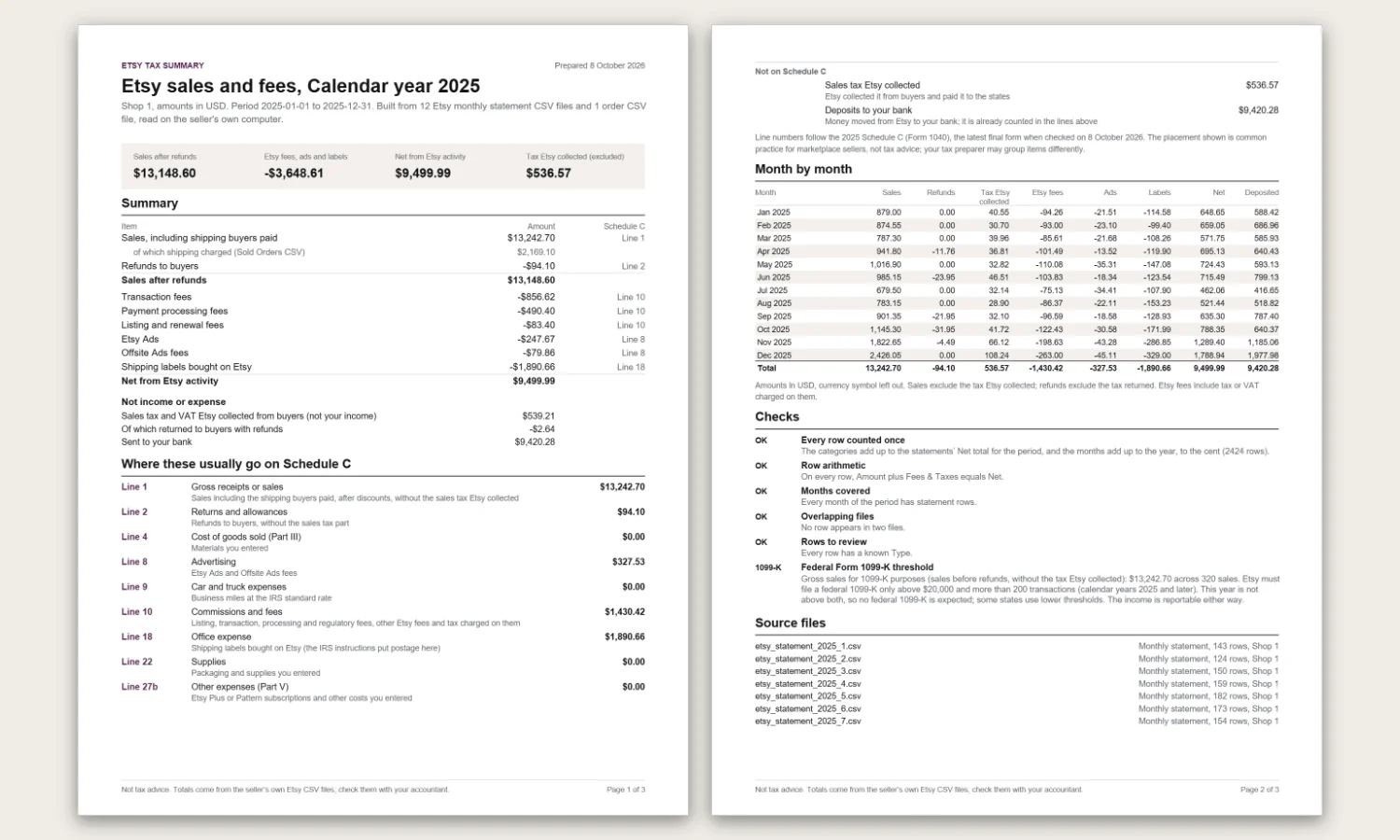
Free finishes the year on screen
Every number is visible, and you may copy it by hand.
- Sales, refunds, each fee, ads, labels and deposits, month by month
- The sales tax Etsy collected taken out and shown on its own line
- US Schedule C lines and UK SA103S boxes
- The checks, the 1099-K comparison and the rows it could not sort
Pro hands it over
For the seller who does not want to retype any of it.
- The PDF above, ready to send or print
- Every statement row with its category and form line, as CSV and XLSX
- Several shops, each on its own or combined
- The UK tax year, 6 April to 5 April, or to 31 March
- Materials, packaging and business miles at the IRS or HMRC rate for the date
Pro
The year, ready to hand to your accountant
- A PDF report: summary, Schedule C lines or SA103S boxes, the month table, the checks and the list of source files
- Every statement row with its category and form line, as CSV and XLSX
- Several shops: each on its own or combined in one report
- The UK tax year, 6 April to 5 April (or to 31 March)
- A list for materials, packaging and business miles, priced at the IRS or HMRC rate for the date, for an estimated profit
$19 one-time, no subscription
Buy ProPaddle.com, the seller of record, handles payment and refunds. Pro turns on in this browser once you pay, and the link we email you turns it on in another browser. A key from an earlier Gumroad purchase still works. The free summary stays free.
Questions
Are my files uploaded anywhere?
No. The CSV files are read by JavaScript in this page, on your computer. Nothing is sent to a server, and closing the tab discards them. If you buy Pro, Paddle.com takes the payment and our license service only asks Paddle whether the purchase is valid; a key from an earlier Gumroad purchase is checked with Gumroad. We count page visits with Cloudflare Web Analytics: no cookies, no personal data, and never your files. When you click a Pro button, a counter of our own adds one to a daily total for this tool, with the page and the kind of site that sent you: no cookies, no personal data, no IP address kept, and never your files.
Do I need all twelve monthly statements?
For a full year, yes: each statement covers one calendar month. The summary names any month that has no rows. For a UK tax year you also need the April statement of the following year, because the year ends on 5 April.
Why doesn’t my total match my 1099-K or my deposits?
Etsy’s 1099-K reports gross sales: what buyers paid before refunds, fees or shipping costs, without the sales tax Etsy collected. Deposits are what was left after fees, refunds and taxes, paid out on your deposit schedule. The summary shows each of these and how they connect. If you add the Etsy Payments sales CSV, it also shows the total of its Gross column, which Etsy says is the 1099-K figure.
Is the sales tax Etsy collected part of my income?
Etsy collects and remits US sales tax as the marketplace in states with marketplace facilitator laws, and VAT on some orders. The statement adds it to the sale and takes it back out on a Tax row. The summary leaves it out of sales and shows it on its own line. Etsy says these amounts are not on the 1099-K.
Where do Etsy fees go on Schedule C?
Common practice is listing, transaction, processing and regulatory fees on line 10 (commissions and fees), Etsy Ads and Offsite Ads on line 8 (advertising) and Etsy shipping labels on line 18 (office expense, which the IRS instructions say includes postage). Your tax preparer may group them differently. The Schedule C guide goes line by line.
Does it work for UK shops and other currencies?
Yes. The statement layout is the same in every currency. The UK view maps the totals to the boxes of the SA103S self-employment page, and Pro adds the 6 April to 5 April tax year. Shops in other countries get plain categories. See Etsy income on UK Self Assessment.
Is this tax advice?
No. It totals your own Etsy records and shows where these amounts usually go. Your situation may differ, for example with inventory, VAT registration or more than one business, so check the figures with your accountant or tax software.
Etsy tax guides
Not tax advice: the summary totals your own records; check them with your accountant. Not affiliated with or endorsed by Etsy, Inc. Etsy is a trademark of Etsy, Inc.; we name it only to say which files the tool reads.