Your Strava year in review, free, from your own export
Strava keeps its yearly recap for subscribers. The bulk export it gives every athlete has the whole year in it, so open it here: distance, hours, climbing, your sports and months, the hours you train, your longest day and your longest streak. Then save a story card. It all runs in this browser tab, and the file is never uploaded.
Open your Strava export
The ZIP from Strava’s “Download your account” email, as it is, or just the activities.csv inside it. Exports in any language work.
Or drag the ZIP or the folder onto this box. The sample is a made-up athlete, built in your browser.
No export yet? Ask Strava for it now; the email can take a few hours.
Reading your export
Starting
That file has no activities in it
Your export is read in this tab and never uploaded. Only activities.csv and the gear lists are opened; photos and profile details in the same ZIP stay shut. We count page visits with Cloudflare Web Analytics: no cookies, no personal data, and never your files.

Your year in sport
0 km
Distance
- Activities
- 0
- Moving time
- 0
- Elevation gain
- 0
- Active days
- 0
Sports
Month by month
When you train
Highlights
Sport by sport
Gear mileage
Year against year
Route poster
What was read
Get your export from Strava
Strava calls it a bulk export, or your account archive. It is free for every account. Ask for it on the website; the app has no button for it.
- Log in on strava.com in a browser, on a computer if you can.
- Open Settings, then My Account. The menu is under your name, top right.
- Under “Download your account”, choose Get Started, then Request download.
- Wait for the email. Strava’s help page says it “may take a few hours”. The link in it downloads a ZIP.
- Open that ZIP here, as it is. No need to unzip it, however large it is: Yearlap reads only the parts it needs.
More detail, what the ZIP holds and what to do when the email doesn’t come: how to download your Strava data. Source: Strava Support, “How do I export my Strava data?”, checked 22 October 2026.
Works with an export in any language
Strava writes the export in your account’s language: the column names, the dates and one of the two distance columns. Tools that look for “Activity Date” and “Distance” stop working when the file says “Datum van activiteit” and “Afstand”. Some ask you to switch Strava to English and request the export again, which costs another wait.
Yearlap doesn’t need the words. The columns come in the same order in every language, and the export repeats two of them in a block of raw numbers (seconds and metres, always with a decimal point). Yearlap finds that repeat, reads the numbers from it and understands dates written in English, German, Dutch, French, Spanish, Italian, Portuguese and more. Your sports keep the names your export gives them.
| Column | English | French | Dutch |
|---|---|---|---|
| 2 | Activity Date | Date de l’activité | Datum van activiteit |
| Date | Aug 1, 2020, 12:02:05 AM | 18 mai 2026, 05:35:05 | 3 mrt 2026, 06:30:00 |
| 7 | Distance: 73.47 | Distance: 4,97 | Afstand: 10,02 |
| 18 | Distance: 73472.5 | Distance: 4978.7 | Afstand: 10021.4 |
| 4 | Ride | Vélo | Fietsrit |
Yearlap Pro
$5 once. No subscription, no account.
- Every year in your export, and all-time totals.
- Year against year: distance, time, climbing and active days, with the change from the year before.
- Gear mileage: how far each pair of shoes and each bike has gone, this year and over its whole life.
- A page for each sport: totals, months, average pace or speed, the longest and the fastest.
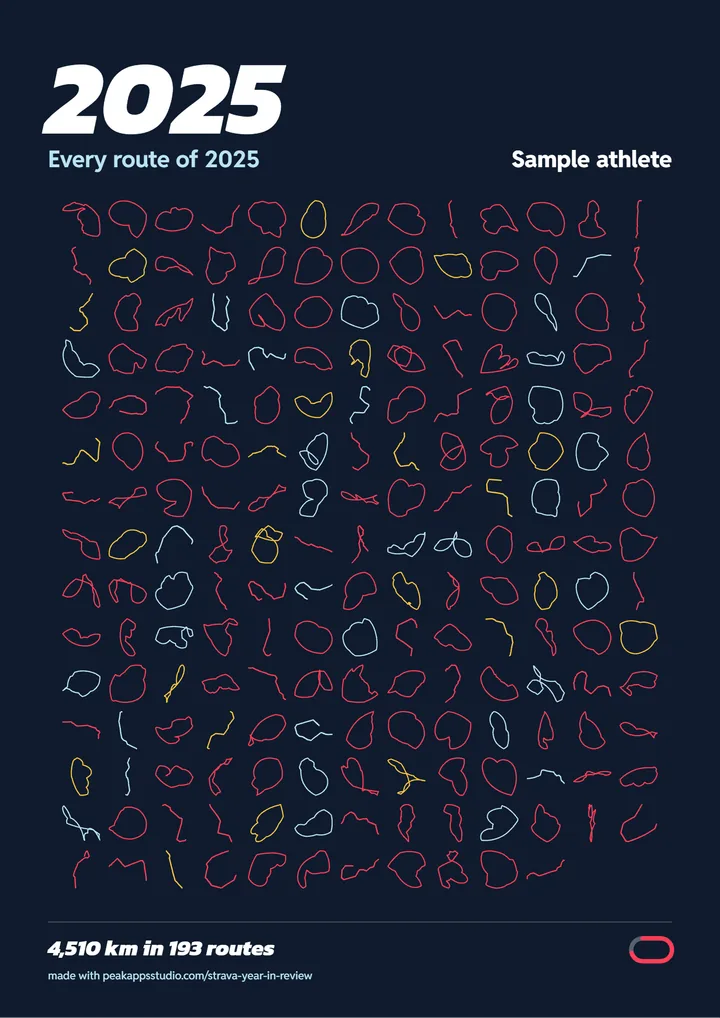
- The route poster: every route of the year side by side, from the GPS files in your export, as a 3000 by 4243 pixel PNG for printing.
- All nine story cards and a CSV of your year.
Pro is not active on this browser.
Payment and the license key are handled by Gumroad. The key works on any browser you paste it into, and on the German and Dutch pages.
Why a free year in review
In December 2025 Strava made Year in Sport, its yearly recap, available to subscribers only. CNET put the subscription at $80 a year, and Strava’s own post on 9 December 2025 said the recap was “available now to subscribers”. Your activities, and the right to download them, stay yours on a free account. Yearlap turns that download into a year in review, and asks for money only for the extras.
Questions
Can I see my Strava year in review without a subscription?
Strava’s own recap, Year in Sport, has been for subscribers only since December 2025. Your data is still yours to download for free: ask Strava for your account archive, open the ZIP on this page, and Yearlap shows the same kind of year from it, with story cards to share.
How do I download my Strava data?
On strava.com (not the app): Settings, My Account, then under Download your account choose Get Started and Request download. Strava emails you a link; its help page says this may take a few hours. The ZIP has activities.csv and a folder of route files. Step by step: how to download your Strava data.
My export is in German, Dutch or French. Does Yearlap read it?
Yes. Strava writes the column names, the dates and one of the distance columns in your account’s language. Yearlap reads the columns by their position and takes the numbers from the export’s raw columns, so an export in German, Dutch, French, Spanish, Italian, Portuguese or English gives the same totals.
Is my Strava export uploaded anywhere?
No. The ZIP is opened by JavaScript in your browser tab and is never sent to a server. Only activities.csv, bikes.csv and shoes.csv are opened, and the route files only when you draw the Pro poster; photos and profile details are left unopened. Closing the tab discards everything. Privacy.
Why are my numbers different from what Strava shows?
Yearlap adds up the moving time, distance and elevation gain written for each activity in activities.csv. Strava writes start times in UTC, so Yearlap counts days and hours in the time zone you pick, your device’s by default. Strava does not publish exactly how its recap counts, so small differences are normal.
Can I see my Strava stats for last year?
Yes. The free version shows the latest year in your export, and in January and February the year before, when the export has it. Every other year, all-time totals and year against year are part of Pro.
Is Yearlap made by Strava?
No. Yearlap is an independent tool by Peak Apps Studio. It is not affiliated with, endorsed by or sponsored by Strava, never connects to Strava and never asks for your login. Strava is a trademark of Strava, Inc.